
Overview
Merchant Messages
Paze supports offer messaging to promote Paze-specific offers and incentives at key moments in the purchase flow. These messages help customers understand the value of checking out with Paze and are rendered automatically by the Paze JavaScript SDK once enabled.
Merchants control where messages appear. Paze manages what message is shown.
Offer messages can be displayed on multiple merchant-controlled surfaces. The integration is the same across all pages, but placement varies based on page context.
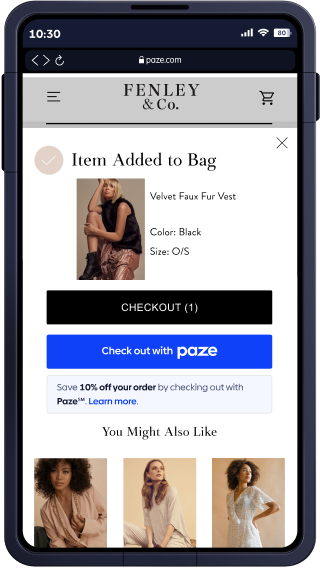
Cart
On the cart or mini-cart page, offer messaging reinforces the benefit of choosing Paze before checkout begins.
Messages are typically placed near the Paze payment option or payment method selection.
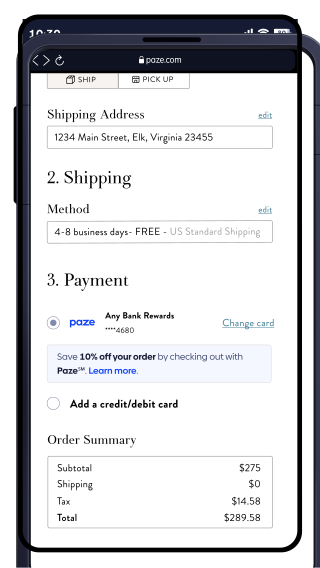
Checkout
On the checkout page, offer messaging appears close to the Paze payment option to clearly associate the offer with that payment method.
This placement performs well for confirming value at the point of payment selection.
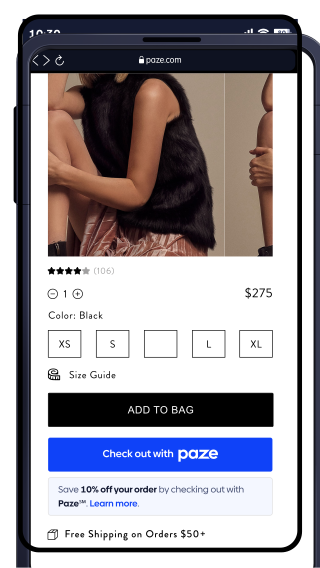
Product Details Page
On product detail pages, offer messaging is commonly placed near the purchase decision—such as near the price, savings summary, or the Paze payment option.
This helps customers understand the value of using Paze before adding an item to their cart.
Updated about 1 month ago