
Integrate Button
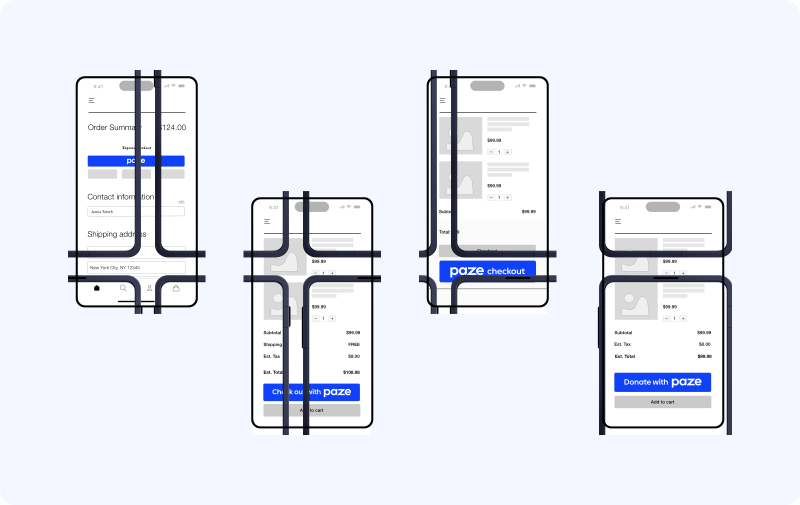
The Paze® Button
Use the Paze JavaScript SDK to create an embedded checkout button for your website. Paze provides buttons designed to align with various user call to actions. And, in various styles to fit your user interface. Add the Paze button wherever the customer starts checkout, such as the cart, product details or checkout pages. The Paze button, by default, uses our recommended label, shape, and color. To match the merchant experience, you can customize the following:
- Set the color, shape, and label to match your website.
- Set the label before or after the Paze logo
- Text font defaults to the user’s device for consistency
- Place the button by following the UX guidelines
Add the Paze button
The JavaScript SDK supports a custom HTML tag "paze-button" supporting the following attributes
Attribute | Type | Usage | Default | Description |
|---|---|---|---|---|
Color | `white' , 'whitewithoutline' ,'midnightblack' , 'pazeblue' | Optional | 'pazeblue' | The background color of the button |
Shape | 'default', 'rectangle', 'pill' | Optional | 'default' | The shape of the button |
disableMaxHeight | boolean | Optional | Disables the button default 'max-height' | |
Label | 'checkout', 'checkout with', 'Donate with' | Optional | The text with the Paze logo. |
Default Paze button
After you’ve loaded the SDK, render the default Paze button. The default Paze button contains a minimum width of 200px and a minimum height of 40px.
<!DOCTYPE html>
<html>
  <head>
  </head>
  <body>
    <div>
      <paze-button></paze-button>
    </div>
    <script
    src=”https://checkout.wallet.cat.earlywarning.io/web/resources/js/digitalwallet-sdk.js” type=”text/javascript”>
    </script>
    <script>
      let digitalWalletAdaptor = window.DIGITAL_WALLET_SDK;
    </script>
  </body>
</html>
Button shape
You can update the shape of the button by adding a shape attribute.
<!DOCTYPE html>
<html>
  <head>
  </head>
  <body>
    <div>
      <paze-button shape="pill"></paze-button>
    </div>
    <script
    src=”https://checkout.wallet.cat.earlywarning.io/web/resources/js/digitalwallet-sdk.js” type=”text/javascript”>
    </script>
    <script>
      let digitalWalletAdaptor = window.DIGITAL_WALLET_SDK;
    </script>
  </body>
</html>
Button color
You can render the button to one of the four available colors.
<!DOCTYPE html>
<html>
  <head>
  </head>
  <body>
     <div>
      <paze-button color="midnightBlack" shape="rectangle"/>
    </div>
    <script
    src=”https://checkout.wallet.cat.earlywarning.io/web/resources/js/digitalwallet-sdk.js” type=”text/javascript”>
    </script>
    <script>
      let digitalWalletAdaptor = window.DIGITAL_WALLET_SDK;
    </script>
  </body>
</html>
Color & Shape
You can render the Paze button with available shape and color attributes.
<!DOCTYPE html>
<html>
  <head>
  </head>
  <body>
     <div>
      <paze-button color="midnightBlack" shape="rectangle"/>
    </div>
    <script
    src=”https://checkout.wallet.cat.earlywarning.io/web/resources/js/digitalwallet-sdk.js” type=”text/javascript”>
    </script>
    <script>
      let digitalWalletAdaptor = window.DIGITAL_WALLET_SDK;
    </script>
  </body>
</html>
Max height
The buttons default max height can be disabled to allow for additional customization. DisableMaxHeight attribute disables default max height(60px) on the button and inherits the parent element height.
<!DOCTYPE html>
<html>
  <head>
  </head>
  <body>
     <div style="width: 300px; height: 80px;">
      <paze-button/>
    </div>
    <script
    src=”https://checkout.wallet.cat.earlywarning.io/web/resources/js/digitalwallet-sdk.js” type=”text/javascript”>
    </script>
    <script>
      let digitalWalletAdaptor = window.DIGITAL_WALLET_SDK;
    </script>
  </body>
</html>
Error handling
We expose an optional _onError callback that you can use to react to any error that occurs during the lifecycle of the button.
document
        .querySelectorAll('paze-button')
        .forEach((b) => b.addEventListener('click', () => {
          b._onError = (error, b) => {
            console.log("error from button element", error)
          }
}));
When _onError is called, it's invoked as a catch-all error handler for the button component. When _onError is not provided all errors are still logged to the browser console.
Resources
- Paze Button Guidelines
- Paze User Interface Standards
Updated 12 days ago