
Web SDK Guide
Overview
This guide walks through integrating Paze℠ Auto Initiate within your checkout experience using a Review and Pay flow. This flow allows customers to review their order details on the merchant site before completing payment through the Paze wallet. Watch the video below to understand the interactions between your Customer, your Server, the Paze JS SDK, the Paze Server, and the Payment Processor.
At a high level, the sequence includes:
- Initializing the SDK
- Authenticating the customer with Paze via their email or mobile number
- Launching the Paze Checkout Experience if the customer has a linked Paze Wallet
- Handling requests and responses
- Completing the transaction
Sequence Diagram
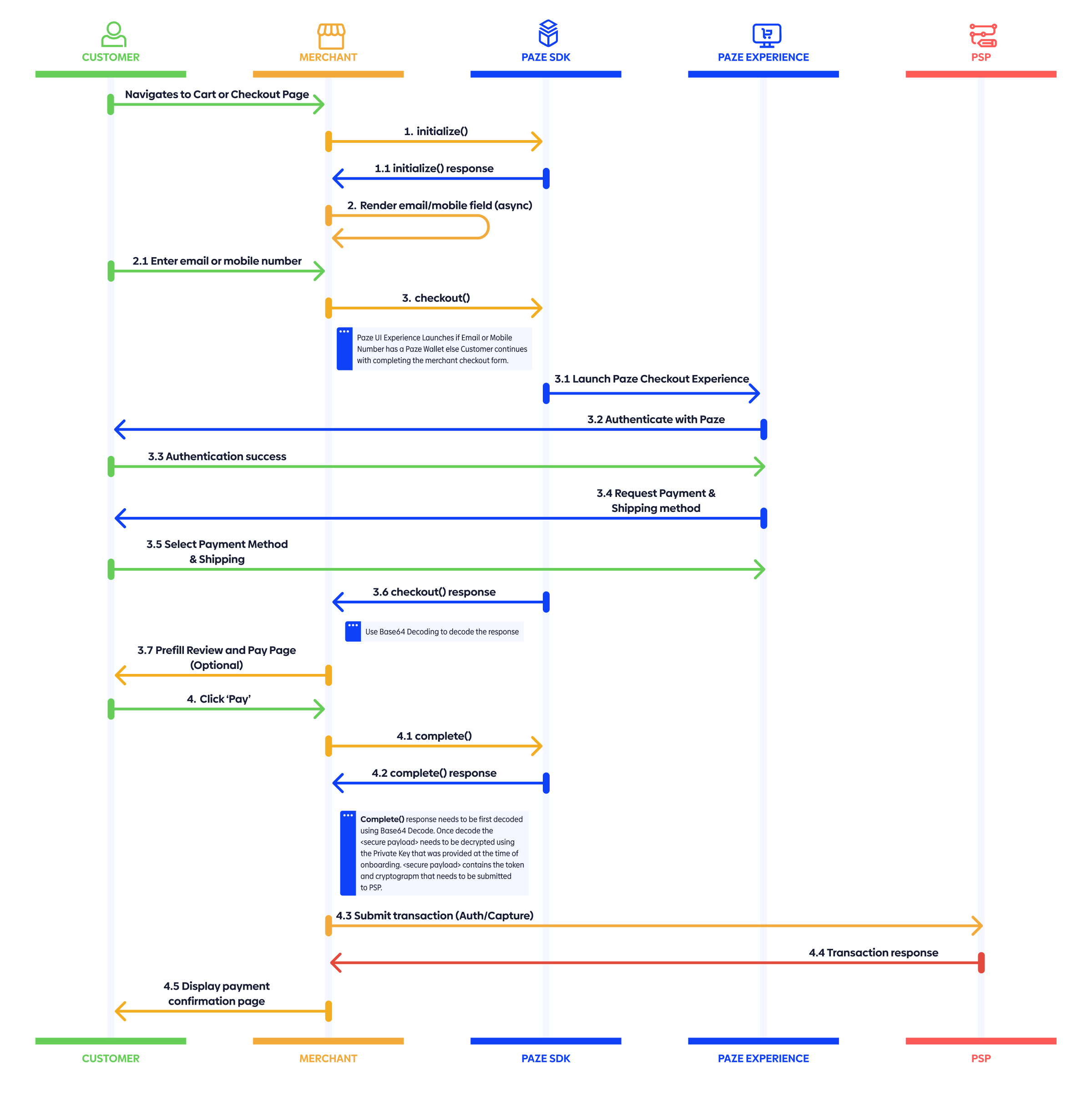
The following sequence diagram illustrates how the merchant site, Paze SDK, and Paze Experience interact during this process. It’s meant as a quick reference to understand the end-to-end flow before a deep dive into the sequence diagram and detailed integration steps.
Integration Steps
There are four basic steps to integrate Auto Initiate and Review and Pay flow from the Paze SDK with your application:
Each step includes what’s happening, why it matters, when to implement, and notes on best practices.
1. Load: Include the Paze SDK using the script tag
<!-- Paze SDK (choose environment) -->
<!-- 0. Sandbox -->
<script src="https://checkout.wallet.cat.earlywarning.io/web/resources/js/digitalwallet-sdk.js"></script>
<!-- 1. Production -->
<!-- <script src="https://checkout.paze.com/web/resources/js/digitalwallet-sdk.js"></script> -->
WHAT: Load the Paze SDK. It attaches a global object to the window named
DIGITAL_WALLET_SDK. The merchant later reads from that global in the JavaScript code. (in Step 2)WHY: You need the SDK available before you can
initialize(), call functions, or launch the Paze Checkout Experience.WHEN: Add the
<script>tag once per page where auto-initiate can trigger, usually the cart or checkout pages.BEST PRACTICES: Include exactly one environment (sandbox or production) and keep the email or phone number field visible since auto-initiate is dependent on either a customer email or customer mobile phone number.
2. Initialize: Configure the Paze SDK using initialize()
const paze = window.DIGITAL_WALLET_SDK;

await paze.initialize({
  client: {
    // Required
    id: "YOUR_CLIENT_ID", // Required: assigned by Paze Distributor
    profileId: "YOUR_PROFILE_ID", // Required: assigned by Paze Distributor
    name: "YOUR_MERCHANT_DISPLAY_NAME", // Recommended: customer-friendly name associated with merchant site the customer is shopping on
  },
});
WHAT: You create a configured SDK instance tied to your merchant identifier. After the await resolves, the SDK is ready. The
client.idis the identifier assigned to the merchant at onboarding. Theclient.profileIdis also assigned during onboarding. Both of these values are issued by Paze.WHY:
initialize()authenticates and scopes all subsequent calls to your merchant profile.WHEN: This should be called once on page load to avoid customer experience delays.
BEST PRACTICES: On Error, fail gracefully; do not block the native checkout flow on fail.
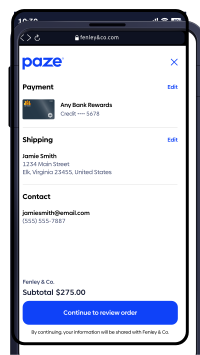
client.nameis rendered if available, else the default used is “merchant.” In this example “Bexleigh” is theclient.name. This should be a consumer-friendly name associated with the merchant site they are shopping on.
Example with client.name set to Fenley & Co.
3. Checkout: Launch the Paze Wallet if a linked account is found using checkout()
const checkoutResponse = await paze.checkout({
  // Identity and session
  emailAddress: "[email protected]", // Preferred: Required if lookup by email (email OR phone)
  mobileNumber: "CUSTOMER_MOBILE_NUMBER", // Conditional: Required if lookup by phone (email OR phone)
  sessionId: "YOUR_SESSION_ID", // Recommended: same value per session that is used to link the transaction in your system

  // Flow control (this is for modifying how the Paze Experience works)
  actionCode: "START_FLOW", // Optional: START_FLOW (default and option required for Auto Initiate Flow)
  intent: "REVIEW_AND_PAY", // Required: REVIEW_AND_PAY required for Review and Pay Flow
  confirmLaunch: true, // Recommended: Show consent screen before Paze launches (default = false)

  // Amount to display
  transactionValue: {
    // Recommended: as it renders subtotal in Paze Experience
    transactionCurrencyCode: "USD", // Conditional with transactionValue
    transactionAmount: "149.99", // Conditional with transactionValue
  },

  // Address and card controls
  shippingPreference: "ALL", // Optional: ALL (default) | NONE
  billingPreference: "ALL", // Optional: ALL (default)
});

// checkoutResponse → { result: "COMPLETE" | "INCOMPLETE", checkoutResponse?: "<JWS>" }
WHAT:
checkout()results in the launching of the Paze UI conditionally. If theemailAddressormobileNumberhas a linked Paze Wallet, then Paze launches the UI. If not, Paze does not launch the UI, and the merchant flow proceeds seamlessly. Paze then passes identity, session data, and controls that tune the flow: intent, card/address preferences, accepted networks, etc. Within the UI, the customer authenticates and selects the payment method. The call resolves with a result ofCOMPLETEorINCOMPLETEand a <JWS> on success.WHY: This is the actual customer interaction where they authenticate and select payment method inside the wallet.
WHEN: On email or mobile phone number field blur (customer tabs / clicks away) in the merchant's cart or checkout page. This should only be called after
initialize().BEST PRACTICES: You should reuse the same
sessionIdthroughout checkout. Keep the flow as minimal as possible and only pass the options that you need. Handle theINCOMPLETEresponse by falling back to the normal merchant checkout flow. Restore focus to your checkout form to return to your native flow to avoid customer dead-ends. Storing the last four digits returned for future reference on payment review and confirmation pages and emails is also recommended.
Response to the checkout() call
checkout() returns a result of COMPLETE or INCOMPLETE and if complete the response contains a JSON Web Signature (JWS) called checkoutResponse. The checkoutResponse object contains information that can be used to pre-populate a merchant’s review and pay page. This checkoutResponse JWS can be decoded with a Base64 decoder.
checkout() Response
{
  "result": "COMPLETE", // Required: String (Enum: COMPLETE | INCOMPLETE)
  "checkoutResponse": "eyJhbGciOi..." // Conditional: only when result === COMPLETE; String (JWS<CheckoutResponse>)
}
Decoded JWS<CheckoutResponse>
{
  "sessionId": "abc123", // Optional: String (echoed if provided)
  "consumer": {
    // Required: Object (Consumer)
    "firstName": "Jane", // Optional: String
    "lastName": "Doe", // Optional: String
    "fullName": "Jane Doe", // Required: String
    "emailAddress": "[email protected]", // Required: String (RFC 5322)
    "mobileNumber": {
      // Optional: Object (PhoneNumber)
      "countryCode": "1", // Required: String (ISD code)
      "phoneNumber": "5551234567" // Required: String
    }
  },
  "maskedCard": {
    // Required: Object (MaskedCard)
    "digitalCardId": "uuid-1234-5678", // Required: String (UUID)
    "panLastFour": "4242", // Required: String (last 4 digits)
    "paymentAccountReference": "PAR1234567890", // Required: String (PAR)
    "panExpirationMonth": "12", // Conditional: String (MM)
    "panExpirationYear": "2028", // Conditional: String (YYYY)
    "paymentCardDescriptor": "Rewards Plus", // Required: String
    "paymentCardType": "CREDIT", // Required: Enum (CREDIT | DEBIT)
    "paymentCardBrand": "VISA", // Required: Enum (VISA | MASTERCARD)
    "paymentCardNetwork": "VISA", // Required: Enum (network)
    "digitalCardData": {
      // Required: Object (Digital Card Data)
      "artUri": "https://cdn.paze.com/cardart/visa.png", // Required: URL
      "artHeight": 48, // Required: Number (px)
      "artWidth": 76 // Required: Number (px)
    },
    "billingAddress": {
      // Conditional: Object (Address)
      "line1": "123 Main St", // Required: String
      "city": "Phoenix", // Required: String
      "state": "AZ", // Required: String
      "zip": "85001", // Required: String
      "countryCode": "US" // Required: String (ISO 3166-1 alpha-2)
    }
  },
  "shippingAddress": {
    // Conditional: Object (ShippingAddress)
    "name": "Jane Doe", // Required: String
    "line1": "123 Main St", // Required: String
    "city": "Phoenix", // Required: String
    "state": "AZ", // Required: String
    "zip": "85001", // Required: String
    "countryCode": "US", // Required: String (ISO 3166-1 alpha-2)
    "deliveryContactDetails": {
      // Optional: Object
      "contactPhoneNumber": {
        // Optional: Object (PhoneNumber)
        "countryCode": "1", // Required: String
        "phoneNumber": "5551234567" // Required: String
      },
      "contactFullName": "Jane Doe" // Optional: String
    }
  }
}
4. Complete: Finalize the transaction using complete()
const completeResponse = await paze.complete({
  // Transaction semantics
  transactionType: "PURCHASE", // Required: "PURCHASE" | "CARD_ON_FILE" (store/manage for later use) | "BOTH" (CARD_ON_FILE + PURCHASE)
  sessionId: "YOUR_SESSION_ID", // Recommended: same value per session

  transactionValue: {
    // Conditional: Required if transactionType is "PURCHASE" or "BOTH"
    transactionCurrencyCode: "USD", // Required with transactionValue
    transactionAmount: "149.99", // Required with transactionValue
  },

  // Output behavior
  transactionOptions: {
    // Optional
    payloadTypeIndicator: "PAYMENT", // Optional: "ID" (return only an ID) | "PAYMENT" (return JWE now)
    billingPreference: "ALL", // Optional: "ALL" | "NONE"
  },

  // Additional metadata (if used by your risk/processor flows)
  enhancedTransactionData: {
    // Optional
    // Example placeholders:
    // orderId: "ORDER-12345",
    // riskScore: 42,
    // channel: "ECOMMERCE"
    // (Replace with your real ecom data fields)
  },
});

// completeResponse → { completeResponse: "<JWS containing payloadId[, securedPayload]>" }
WHAT: You ask the SDK to finalize and return the payment payload that your payment processor needs. Your promise resolves with a
completeResponse: <JWS> that contains thesecuredPayload.WHY:
complete()gives you the tokenized, signed result that is needed for your payment processor.WHEN: Immediately after
checkout()is finished and you are ready to submit the order.BEST PRACTICES: Idempotency: include/track so retries do not double-charge. Retries should not use the same cryptogram from Paze. Include any
enhancedTransactionDatathat your risk or processor flows use. On Error, fallback to your standard payment methods to avoid customer drop-off.
Response to complete() call
complete() response contains a JSON Web Signature completeResponse which can be verified with Paze public key for authenticity, then decoded with a Base64 decoder. This contains the sessionId which matches the other calls in this session. The securedPayload is a JSON Web Encryption (JWE) that is encrypted and must be decrypted with the merchant's private key associated with the certificate provided by the merchant during onboarding. This object contains the data needed for your payment processor to process the transaction. The dynamic data cryptogram is sent by the merchant to the payment processor and is valid for 24 hours.
complete() Response
completeResponse is a JWS (JSON Web Signature) containing the signed response payload.
{
  "completeResponse": "eyJhbGciOi..." // Required: String (JWS<CompleteResponse>)
}
BEST PRACTICES: We strongly recommend that you send the contents of the
completeResponseto your server for decoding and decryption.
Decoded CompleteResponse
After receiving the completeResponse JWS, first decode it to extract the JSON payload containing payloadId, sessionId, and optionally securedPayload.
{
  "payloadId": "txn-7890-1234", // Required: String (≤ 50 chars)
  "sessionId": "YOUR_SESSION_ID", // Optional: String (echoed if provided)
  "securedPayload": "eyJhbGciOi..." // Conditional: String (JWE<JWS<Payload>>)
}
Decrypted securedPayload
Decrypt the securedPayload using your merchant's private key. The decrypted payload contains sensitive information necessary for you to process the transaction.
{
  "clientId": "merchant-12345", // Required: String
  "profileId": "profile-6789", // Required: String
  "eci": "05", // Optional: String (ECI code)
  "consumer": {
    // Required: Object (Consumer)
    "fullName": "Jane Doe", // Required: String
    "emailAddress": "[email protected]" // Required: String (RFC 5322)
  },
  "billingAddress": {
    // Conditional: Object (Address)
    "line1": "123 Main St", // Required: String
    "city": "Phoenix", // Required: String
    "state": "AZ", // Required: String
    "zip": "85001", // Required: String
    "countryCode": "US" // Required: String (ISO 3166-1 alpha-2)
  },
  "token": {
    // Required: Object (Token)
    "paymentToken": "[Removed]", // Required: String (network token)
    "tokenExpirationMonth": "12", // Required: String (MM)
    "tokenExpirationYear": "2028", // Required: String (YYYY)
    "paymentAccountReference": "PAR1234567890" // Required: String (PAR)
  },
  "paymentCardNetwork": "VISA", // Required: Enum (VISA | MASTERCARD | DISCOVER)
  "dynamicData": [
    // Required: Array<DynamicData>
    {
      "dynamicDataType": "PURCHASE", // Required: Enum (PURCHASE | CARD_ON_FILE)
      "dynamicData": "CiAgICAg...", // Required: String (cryptogram) This is sent to the payment processor as is and is not decrypted by the merchant. The cryptogram is valid for 24 hours.
      "dynamicDataExpiration": "2025-12-31T23:59:59Z" // Optional: String (ISO 8601)
    }
  ]
}
Testing and Error Handling
Environments
- Sandbox (Test) – full wallet flows for integration/QA
- Use Paze-provided test-accounts (emails / mobile numbers) that simulate various customer states
- Test Data Includes:
- Wallet present (active, suspended, no card)
- Different card networks (Visa, Mastercard, Discover)
- Production – live environment, only after certification and approval.
Testing Recommendations
initialize()once and reuse the same sessionId acrosscheckout()andcomplete().- Session timeout: Wallet warns after 6 min, expires after 8 min. Require new session.
- Positive test cases:
- Eligible wallet launches immediately and completes checkout
- Multiple cards: verify card selection
- Multiple addresses: verify shipping selection
- Action codes for
checkout():START_FLOW: launch Paze ExperienceCHANGE_CARD(if used): render card selection screenCHANGE_SHIPPING_ADDRESS(if used): render address selection screen
Error Handling
- Initialization errors: continue normal merchant checkout.
- Ineligible consumer: no popup; continue normal merchant checkout.
- Customer cancel /
INCOMPLETE: no popup; continue normal merchant checkout. - Timeout: wallet closes; require customer to retry with new session.
complete()errors: allow retry with new idempotency key.
Paze SDK Error Response Object
The error response object contains both a reason and a message. The reason is intended for merchant logic to process and handle the issue while the message is intended for human readability and manual debugging or logging. There is an optional array of objects called details that adds specificity to the issue if needed. This details array contains an XPath pointer to the source of the error with a human-readable error message.
{
  "reason": "ERROR_CODE", // Required: String used for merchant error-handling logic
  "message": "This describes the error", // Optional: String for human-readable logging/debugging only
  // Optional: List(Object) of data validation errors
  "details": [
    {
      "location": "Failure pointer", // Required: String XPath or path to failure
      "message": "Specific error for field" // Optional: String specific error for field
    }
  ]
}
For more information on the Error Response Object, see Errors.
Updated 3 days ago